
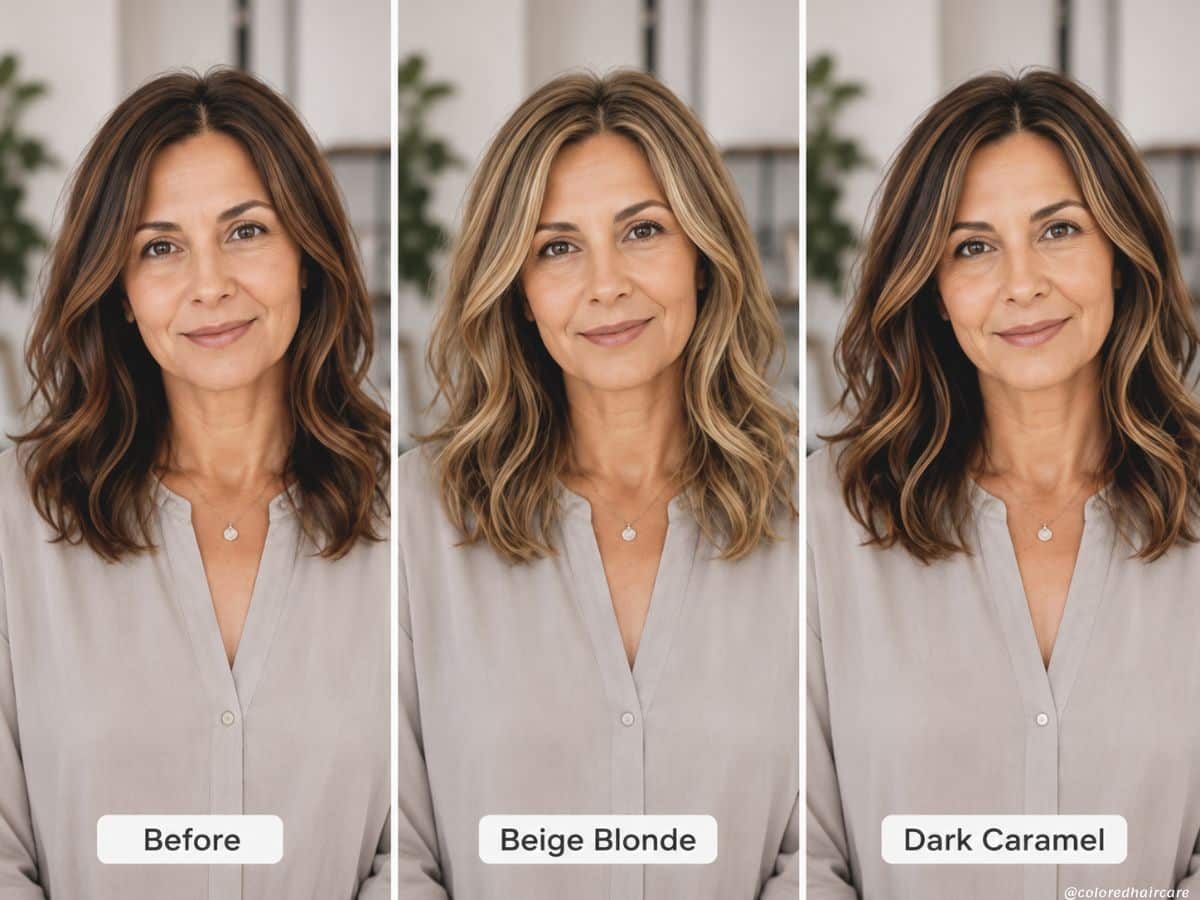

Ever wondered what you’d look like blonde, copper, silver, or even rocking curtain bangs… without risking a full-blown salon regret spiral? Same.
I still remember the time I convinced myself icy platinum was “definitely my color” after one Pinterest scroll too many. Spoiler: my hairdresser looked deeply concerned, and honestly, she was right.
These days though, things are very different. Tools like ChatGPT can now help you virtually try on hair colors and hairstyles using your own photo, and the results are surprisingly impressive.
Whether you want to see yourself with copper hair, test-drive a bold black bob, or figure out if blonde is actually worth the bleach damage, AI makes the whole process easy, fast, and weirdly addictive.
The best part? You don’t need expensive apps, salon consultations, or advanced editing skills. Most AI tools are either free or very low cost, and you can experiment from your sofa while wearing a face mask and questioning every hair decision you’ve ever made. A very modern beauty experience.
Why AI Hair Color Try-Ons Are So Popular
Not long ago, virtual hair apps were honestly terrible. Every hairstyle looked fake, awkward, and slightly haunted.
Now, AI tools like ChatGPT can create surprisingly realistic hair color transformations using your own photo. You can test blonde, copper, brunette, black, or even silver hair in minutes without touching a drop of dye.
And considering how expensive salon visits are these days, it’s easy to see why people love it. Trying on hair colors online lets you experiment safely before making a big change.
It’s also ridiculously fun. One minute you’re testing soft balayage, and the next you’re seriously considering pink hair at 11 p.m. on a Tuesday.
How to Virtually Try On Hair Colors Using ChatGPT
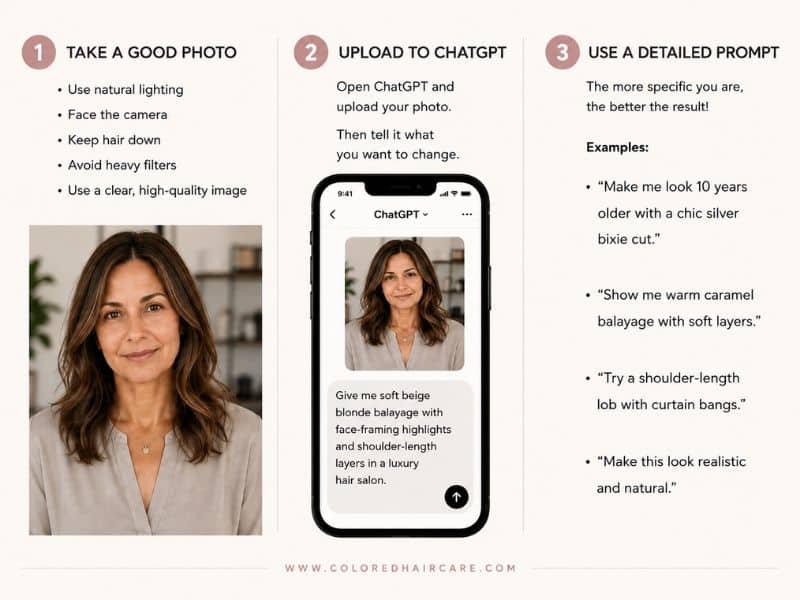
Using ChatGPT as an AI hair color changer is much easier than most people expect. You only need a photo of yourself and a simple prompt.
Here’s how to do it:
- Upload a clear selfie with good lighting.
- Ask ChatGPT to change your hair color or hairstyle.
- Be specific about the look you want. For example:
- “Show me with copper hair and curtain bangs”
- “Give me soft honey blonde balayage”
- “Make my hair dark chocolate brown with glossy waves”
Within seconds, you’ll get a realistic preview of your new look without booking a salon appointment or panic-buying box dye.
What You Need Before You Start
The good news is you don’t need fancy editing skills or expensive software to try on hair colors online.
You only need:
- a clear selfie
- decent lighting
- the ChatGPT app or browser version with image upload support
- optional inspiration photos
For the most realistic results, use a front-facing photo where your hair is visible around your face. Natural lighting usually works best, and it helps to avoid heavy filters, hats, or sunglasses.
Basically, the more natural the photo looks, the better the AI hair color results tend to be.
Step-by-Step: How to Change Your Hair Color with ChatGPT
Using ChatGPT as a virtual hair color try-on tool is surprisingly simple. Once you do it once, you’ll probably end up testing at least seven different versions of yourself “just for fun.”
Here’s how to do it.
Step 1: Upload Your Photo
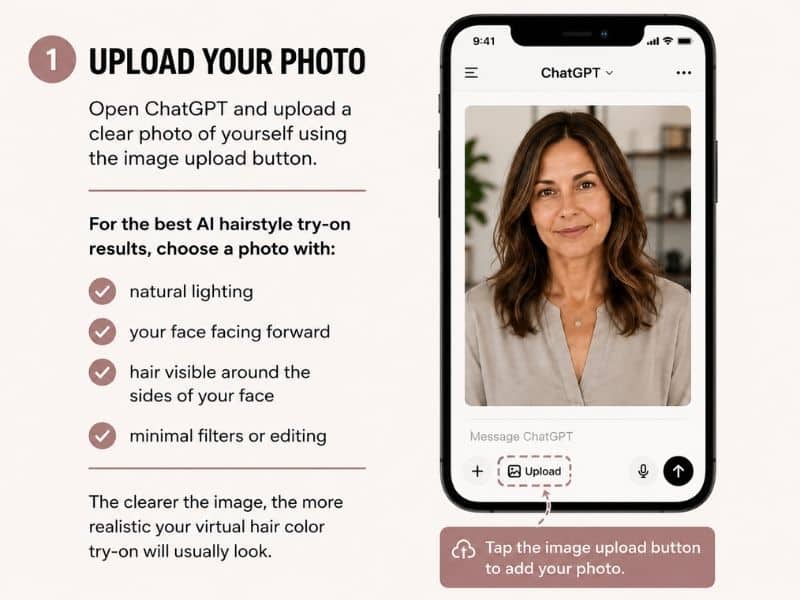
Open ChatGPT and upload a clear photo of yourself using the image upload button.
For the best AI hairstyle try-on results, choose a photo with:
- natural lighting
- your face facing forward
- hair visible around the sides of your face
- minimal filters or editing
The clearer the image, the more realistic your virtual hair color try-on will usually look.
Step 2: Ask ChatGPT to Change Your Hair Color
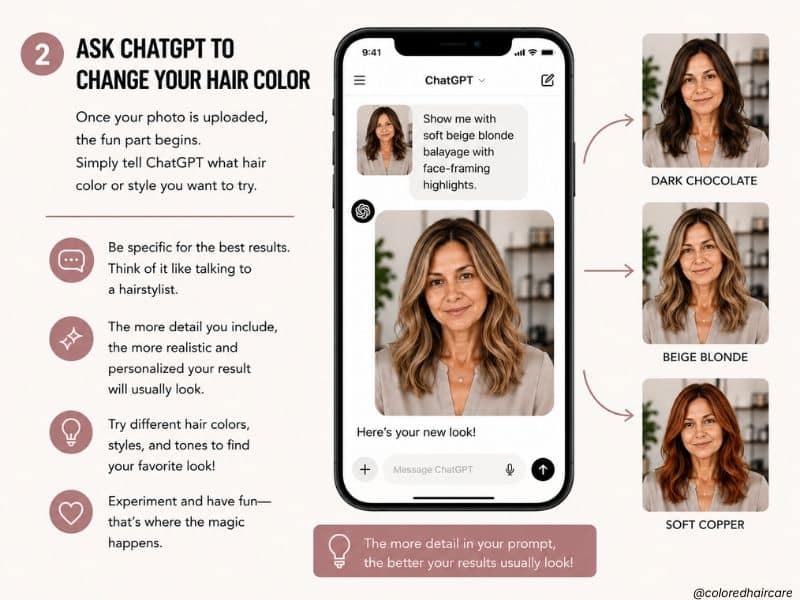
Once your photo is uploaded, the fun part begins. Simply tell ChatGPT what hair color or style you want to try.
The more detailed your prompt is, the better your results usually look. Think of it like talking to a hairstylist. Instead of saying “make me blonde,” describe the exact vibe you want.
Here are a few beginner-friendly examples:
Blonde
“Change my hair to a soft beige blonde balayage with natural salon-quality dimension.”
Brunette
“Show me with rich chocolate brown hair and subtle caramel highlights.”
Gray Blending
“Create a realistic gray blending hair color for women over 50.”
Red/Copper
“Give me soft copper hair with warm highlights and a modern finish.”
Short Hair
“Show me with a chic layered pixie cut and silver-blonde color.”
You can also ask for:
- softer lighting
- more natural tones
- less makeup
- bangs or layers
- shorter or longer hair
Honestly, experimenting with different prompts is half the fun.
Step 3: Refine the Results
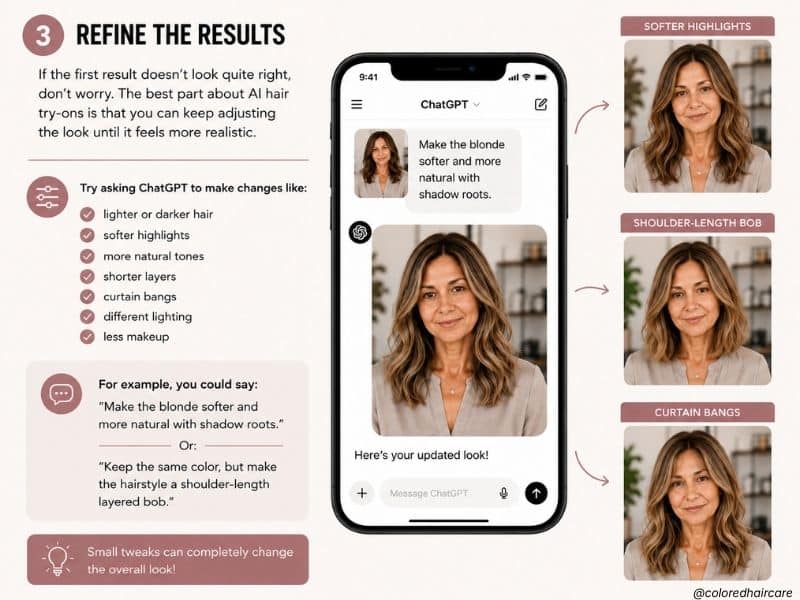
If the first result doesn’t look quite right, don’t worry. The best part about AI hair try-ons is that you can keep adjusting the look until it feels more realistic.
Try asking ChatGPT to make changes like:
- lighter or darker hair
- softer highlights
- more natural tones
- shorter layers
- curtain bangs
- different lighting
- less makeup
For example, you could say:
“Make the blonde softer and more natural with shadow roots.”
Or:
“Keep the same color, but make the hairstyle a shoulder-length layered bob.”
Small tweaks can completely change the final result, so it’s worth testing a few different versions before deciding which look you like best.
My Tips for Getting More Realistic AI Hair Results
A few small details can make a huge difference when using an AI hair color changer.
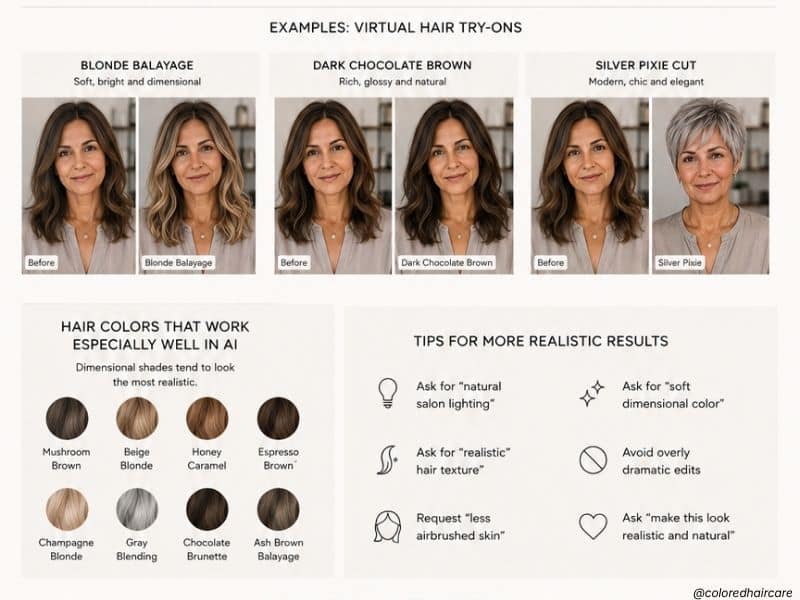
One of the best tricks is using hair color terms that hairstylists actually use. Instead of asking for “light brown,” try phrases like:
- honey blonde
- mushroom brown
- champagne blonde
- warm chestnut
- silver balayage
- gray blending
It also helps to ask for “natural salon lighting” in your prompt. This usually makes the final image look softer and far more realistic.
For example:
“Create a realistic salon-quality image with natural lighting and soft honey blonde balayage.”
And honestly, don’t stop at one shade. Try a few different versions side by side. Sometimes the color you least expect ends up looking the best on you.
Can ChatGPT Also Change Hairstyles?
Yes — and this is where things get dangerously addictive.
Along with hair colors, ChatGPT can also help you try different hairstyles using your photo. You can test:
- curtain bangs
- layered bobs
- pixie cuts
- shoulder-length styles
- long waves
- curly hairstyles
It’s especially helpful if you’ve been thinking about cutting your hair shorter but need a little emotional preparation first.
Try prompts like:
“Show me with a shoulder-length layered bob and soft curtain bangs.”
Or:
“Give me a chic silver pixie cut with natural texture.”
You can even combine color and style changes together to get a more realistic overall transformation.
Things AI Hair Try-Ons Still Can’t Do Perfectly
As impressive as AI hair color tools are, they’re not magic. And honestly, that’s probably a good thing for all of us emotionally unstable fringe people.
The results can sometimes look slightly different from real salon color, especially with:
- very curly hair
- dramatic lighting
- fantasy shades
- major texture changes
AI can also struggle with ultra-precise color placement or complicated cuts. So while the images are amazing for inspiration, they’re not an exact guarantee of how your final hair will look in real life.
Still, they’re incredibly useful for narrowing down styles, testing ideas, and avoiding hair decisions that might otherwise require a recovery period and three deep-conditioning masks.
Best Hair Color Ideas to Try with AI
Not sure where to start? These are some of the most popular shades people test with virtual hair color try-on tools:
Blonde
Soft beige blonde, honey blonde, and champagne balayage are especially flattering for brightening mature skin tones.
Brunette
Rich chocolate brown, mushroom brown, and warm chestnut shades tend to look glossy and natural.
Gray Blending
Silver balayage and soft gray blending are huge right now for women embracing natural grays more seamlessly.
Copper & Auburn
Warm copper tones can make skin look healthier and add instant dimension to dull hair.
Short Hairstyles
Layered bobs, pixie cuts, and shoulder-length styles are some of the most popular AI hairstyle try-ons for women over 40 and 50.
FAQs
Is ChatGPT free for hair color try-ons?
Some ChatGPT features are free, but image generation and editing tools may require a paid plan depending on the version you use.
Can AI show realistic hair colors?
Yes — surprisingly realistic. The results are best used for inspiration rather than exact salon color matching.
What’s the best photo to upload?
Use a clear, front-facing selfie in natural lighting with your hair visible around your face.
Can I try gray hair with AI?
Absolutely. Gray blending, silver hair, and natural gray transitions are some of the most popular AI hair color requests right now.
Does ChatGPT work for short hairstyles too?
Yes. You can try pixie cuts, layered bobs, bangs, shoulder-length cuts, and more using the same process.
Is this better than traditional hair color apps?
In many cases, yes. AI tools like ChatGPT tend to create more realistic lighting, texture, and facial blending than older virtual hairstyle apps.
Final Thoughts
Changing your hair color can feel weirdly stressful. Especially when salon appointments are expensive and one impulsive decision can leave you aggressively Googling “how long does toner take to fade.”
That’s why virtual hair color try-ons are so useful. They let you experiment with different shades, styles, bangs, and cuts without any actual commitment.
Whether you’re curious about blonde balayage, gray blending, copper tones, or a completely new hairstyle, AI tools like ChatGPT make it easy to explore ideas before making a real change.
And honestly, sometimes seeing the photo is all it takes to realize your dream hair color was either absolutely right… or absolutely not.
Thinking about changing your hair? Try a few virtual looks first. You might end up discovering a shade you never expected to love.
Found your perfect shade? We’d love to see it! Tag us on Instagram @coloredhaircare or Facebook and share your hair color stories. Looking for more hair care tips? Check out How to Look After Colored Hair: 11 Expert Secrets For Long-Lasting Color.

Our Research & Review Process
To ensure our recommendations are as comprehensive and reliable as possible, we’ve undertaken an extensive research effort.
We cite scientific evidence and journals, collect real user reviews and gather impartial perspectives from hair stylists, users, and experts in the field.
Additionally, we conduct hands-on testing by using products and applying hair dyes not only on our own locks but also on real human hair extensions and hair pieces of different hair type, textures and lengths.
This rigorous approach allows us to provide you with insights into which products genuinely live up to their promises.
As always – please consult with a professional hair colorist or stylist for advice on how to color your own hair at home. It’s different for everyone!

